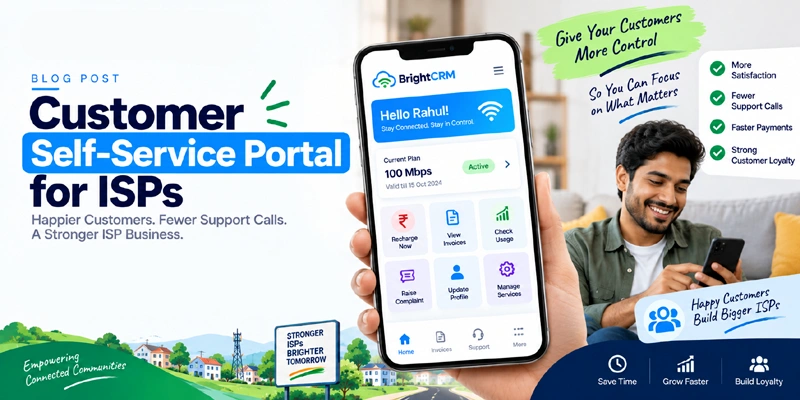
Most Support Calls Aren't Actually Support Issues
Look closely at what your support team handles on a typical day, and a large share of it isn't troubleshooting a real network problem — it's routine account questions. Balance checks. "How do I pay?" "When does my plan expire?" "Can I get a copy of last month's bill?" None of these need a human to answer; they need information the customer should be able to look up themselves.
Every one of these calls also happens on your schedule, not the customer's — meaning if it's after office hours, the customer either waits or gets frustrated. A self-service portal answers all of it instantly, any time of day.
What a Self-Service Portal Actually Lets Customers Do
- Check current balance and plan validity — no need to call and ask
- Recharge or pay their bill directly via UPI, card, or net banking
- View complete payment and billing history — useful for their own records or reimbursement
- Download invoices for GST filing or expense claims
- Raise a support ticket or complaint and track its status, instead of calling repeatedly for updates
- Request a plan change or upgrade without waiting for office hours
- Update contact details like phone number or email on their own
💡 The Shift in Mindset
A self-service portal isn't about making customers do more work — it's about giving them the option to solve a simple need in seconds instead of waiting on hold. Customers who actually want to talk to a person for a real issue can still call; the portal just removes the routine questions from that queue.
Where the Support Load Actually Drops
The reduction shows up in predictable places:
- Balance/validity queries — largely eliminated, since customers can check instantly on their phone
- "How do I pay" calls — reduced, since the payment option is right there in the portal
- Duplicate invoice requests — eliminated, since customers can download past bills themselves
- "Any update on my complaint?" follow-up calls — reduced, since ticket status is visible without asking
What's left for your support team is what actually needs a person: real technical issues, unusual account situations, and customers who genuinely prefer talking to someone.
Web Portal, Mobile App, or WhatsApp — Which Channel?
Self-service doesn't have to mean one single channel:
- Web portal: Accessible from any browser, good as a universal option that works on any device
- Mobile app: Best for customers who want quick, repeat access — balance checks and recharges in a couple of taps
- WhatsApp self-service: Lets customers check balance or pay by simply messaging a keyword, without downloading anything new — often the easiest option for less tech-savvy customers
Offering more than one option means customers use whichever they're already comfortable with, instead of all of them defaulting back to a phone call because the one channel available didn't suit them.
What to Look for in a Self-Service Portal
- Real-time account data — balance and validity that update instantly, not once a day
- Integrated payment options so recharging doesn't require leaving the portal
- Ticket tracking so customers can see complaint status without calling to ask
- Mobile-friendly design — most customers will use this from a phone, not a desktop
- Simple login — OTP-based access is usually easier for customers than remembering a password
- Multi-language support where your subscriber base isn't primarily English-speaking
The Business Impact
📊 What Changes
ISPs that roll out a self-service portal typically see a noticeable drop in routine, low-value support calls within the first month — freeing staff time for actual technical support and new customer acquisition instead of repeating the same balance-check answer dozens of times a day.
How BrightCRM's Customer Portal Works
BrightCRM includes a self-service portal built directly into the same system that runs your billing, so customer data is always current:
- Customers log in via OTP to check balance, plan validity, and payment history
- Recharge and bill payment happen in the same portal — UPI, card, or net banking
- Support tickets can be raised and tracked without a phone call
- Invoices are available for download anytime, matching your GST-compliant billing records
- Because it's connected to your RADIUS integration, a self-service payment triggers the same automatic activation as any other payment method
Real-World Impact
Broadband ISP, Surat
"Balance-check calls basically disappeared once customers realized they could just check the portal. Our support line finally has room to actually help with real issues."
Cable Operator, Patna
"Customers recharge at 11 PM now instead of waiting for our office to open. We didn't have to add staff — the portal just handles it."
Conclusion: Give Customers the Option, Not the Obligation
Not every customer will use a self-service portal, and that's fine — the ones who do are the ones taking routine questions off your support queue entirely. Over time, that's fewer calls, faster answers for customers, and a support team that can actually focus on problems that need a human.
Ready to Let Customers Help Themselves?
See how BrightCRM's self-service portal cuts routine support calls for your ISP.
Schedule Free Demo